Order tags and Shopify Flow
Tag subscription orders and subscribers, filter them in Shopify, and automate emails, Slack alerts and rewards with Shopify Flow.
On this page
Crovio tags every subscription order and every subscriber in Shopify, and sends subscription events to Shopify Flow. Use them to find renewal orders in a click, segment subscribers for emails, and automate whatever you need.
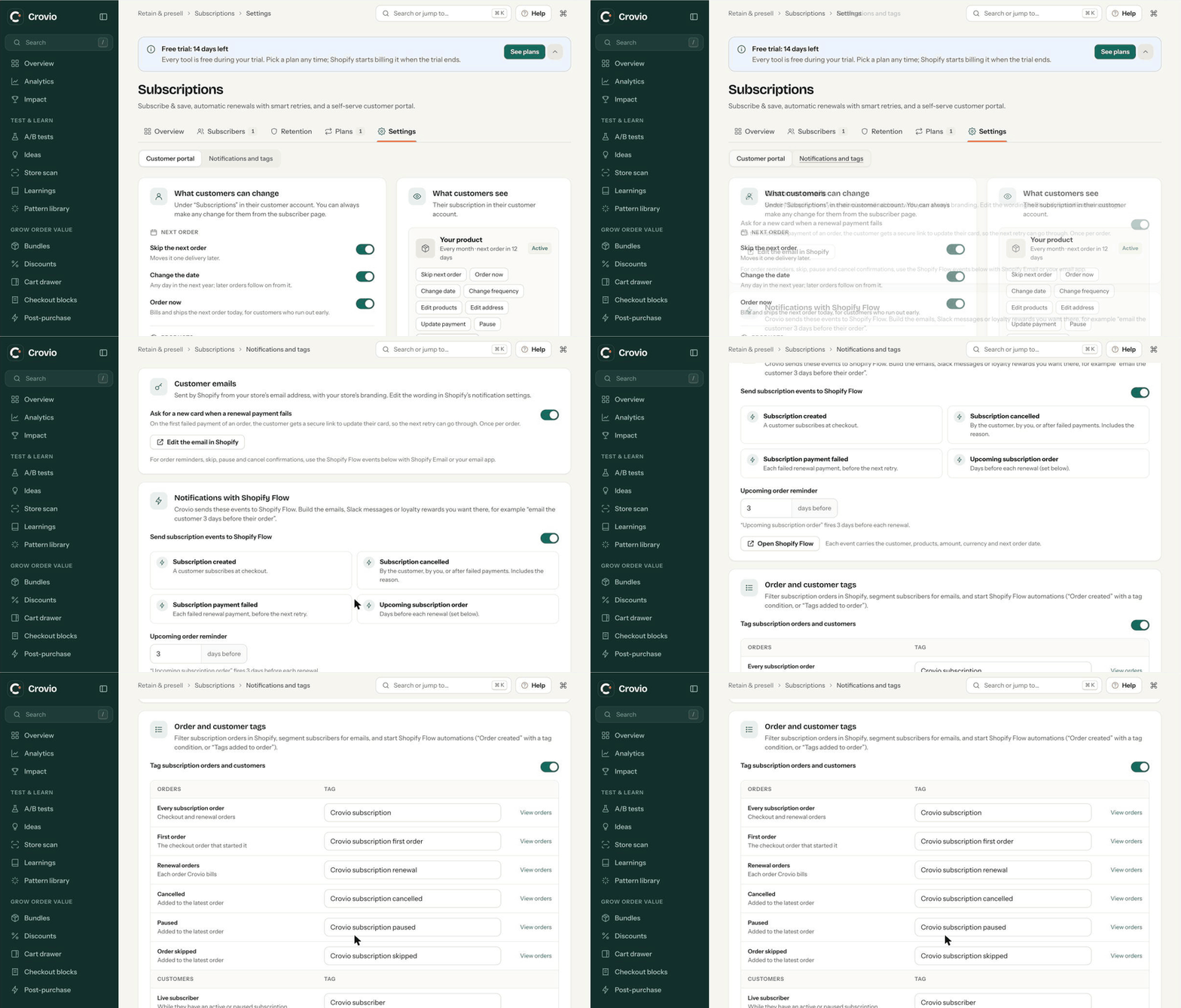
Turn on the tags
- Go to Subscriptions → Settings → Notifications and tags, to Order and customer tags.
- Switch on Tag subscription orders and customers.
- Keep the default tags or type your own (up to 40 characters, no commas). Leave a field empty for no tag.
- Click Save.
New tags apply from now on. Orders placed before you turned tags on (or changed them) aren't re-tagged. Reset to defaults brings the original names back.
The tags
| Tag (default) | Added to | When |
|---|---|---|
Crovio subscription | Order | Every subscription order: the checkout order and each renewal |
Crovio subscription first order | Order | The checkout order that started the subscription |
Crovio subscription renewal | Order | Each order Crovio bills |
Crovio subscription cancelled | Order | The latest order, when the subscription is cancelled |
Crovio subscription paused | Order | The latest order, when it's paused |
Crovio subscription skipped | Order | The latest order, when an order is skipped |
Crovio subscriber | Customer | While they have an active or paused subscription |
Crovio cancelled subscriber | Customer | When their last subscription ends |
Crovio adds the tags a few seconds after Shopify creates the order.
Filter subscription orders in Shopify
- Click View orders next to any order tag in Crovio. Shopify's Orders page opens filtered to that tag.
- Or in Shopify admin → Orders, click Filter → Tagged with and type the tag, for example
Crovio subscription renewal. - Click Save as to keep the filtered view as a tab, so renewals (or first orders) are one click away.
The same tags work in Shopify's order export and in most fulfilment, accounting and reporting apps that read Shopify tags.
Segment subscribers
In Shopify admin → Customers, create a segment with:
customer_tags CONTAINS 'Crovio subscriber'Use it in Shopify Email or your email app for subscriber-only news, or customer_tags CONTAINS 'Crovio cancelled subscriber' for a win-back campaign.
Automate with Shopify Flow
Crovio sends four events to Shopify Flow. Switch them on in Subscriptions → Settings → Notifications and tags, under Notifications with Shopify Flow (on by default).
| Flow trigger | When it runs |
|---|---|
| Subscription created | A customer subscribes at checkout |
| Subscription cancelled | By the customer, by you, or after failed payments. Includes the reason |
| Subscription payment failed | Each failed renewal payment, before the next retry |
| Upcoming subscription order | A set number of days before each renewal (Upcoming order reminder, 0 to 14 days; 0 turns it off) |
Every event carries the customer, the subscription ID, the products, the amount, the currency and the next order date.
Build a workflow
- Open Shopify Flow (the Open Shopify Flow button in Crovio's settings takes you there).
- Click Create workflow → Select a trigger, search Crovio and pick an event.
- Optional: add a Condition, for example Amount is greater than 50 or Reason equals Too expensive.
- Add an Action: Send internal email, Add customer tags, a Slack message, or an action from your email or loyalty app.
- Turn the workflow on.
Ideas
- Renewal reminder: Upcoming subscription order → your email app's "send email" action, so customers can skip or change before they're charged.
- Save at-risk customers: Subscription payment failed → Slack message to your team, plus Add customer tags
payment issuefor follow-up. - Win-back: Subscription cancelled with Reason → add the customer to a win-back flow in your email app.
- Reward loyalty: Subscription created → give points in your loyalty app.
Workflows on tagged orders
Because Crovio tags an order a few seconds after it's created, a workflow that starts on Shopify's Order created trigger can run before the tags are there. For order-level automations, prefer Crovio's events above, or a Scheduled time workflow that uses Get order data with a query such as tag:'Crovio subscription renewal' AND created_at:>=past_day, then acts on each order it finds.
Was this page helpful?